Modern POS terminals are becoming more powerful every year. Many models already come with multiple screens: a main display for the cashier and additional informational passive screens facing the customer. But what if you could turn such a terminal into a real multi‑user system and expand the capabilities of all these screens to full‑fledged checkouts and interactive recommendation screens for customers?
IBIK LLC has successfully tested this scenario using the ASTER multiseat software. In this article, we’ll share test results and real benefits — backed by data and expert assessments.
Successful testing of a POS terminal with three screens
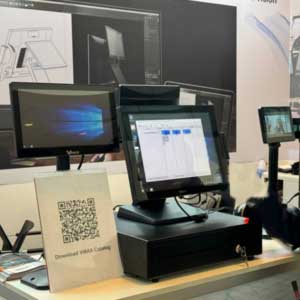
Our specialists conducted tests on a modern POS terminal with three independent screens. Using ASTER, we set up three fully independent workstations on a single device.
Each workstation received its own desktop, applications and touchscreen. The system operated stably, without any noticeable performance degradation.
A representative of the POS terminal manufacturer VMAX commented on the test results:
“This functionality can be used for customizations.”

You can watch the demonstration in action here: Video: 3 workstations on 1 POS terminal. The video shows the ability to connect up to 3 terminals directly at the manufacturer’s stand (VMAX) at the GITEX exhibition in Dubai.
Why use ASTER on POS terminals with multiple screens?
Beyond simply increasing the number of cashiers, this configuration opens up additional use cases. For example, an extra workstation created with ASTER can serve as a dedicated customer touchscreen.
How it works in practice:
- The customer uses the touchscreen to browse the assortment and select additional items — for example, snacks, drinks or accessories.
- This process does not interfere with the cashier’s work.
- The interface can display promotions, up‑sell suggestions or loyalty program terms.
This scenario significantly improves the user experience and is especially useful in:
- Low‑traffic sales points where staff can help customers navigate their choices.
- Stores focused on up‑selling via automated recommendation systems — e.g., electronics stores offering cables, cases or insurance.
- Cafés and quick‑service restaurants promoting add‑ons like desserts or beverages.
According to a 2023 UX study by Nielsen Norman Group, self‑service touchscreen points can increase the average order value by 15–25% when they combine intuitive design with smart product placement. Also, automatically showing and selecting additional offers significantly reduces the cashier’s workload and simplifies the customer’s choice.
Key benefits
- Increased staff throughput: scale from 1 to 2–3 cashiers working simultaneously on one POS terminal.
- Faster service during peak hours: reduce queues and improve throughput during high customer traffic.
- Space savings: free up counter and floor space by reducing the number of physical POS terminals.
- Reduced energy costs: lower power consumption compared to running multiple separate devices.
- Lower maintenance costs: fewer devices mean fewer hardware issues and support calls.
- Substantial equipment savings: no need to purchase additional POS systems.
- Quick deployment: set up multiple workstations in minutes with ASTER — without complex infrastructure changes.
These advantages are especially important for:
- Busy bars and restaurants.
- Food courts with shared service areas.
- Retail stores with high customer traffic.
- Pop‑up shops and temporary sales points where space and budget are limited.
Real business impact: quick calculation
Let’s assume a medium‑sized restaurant operates 12 hours a day and serves an average of 150 customers during peak lunch and dinner shifts.
- With a single‑user POS terminal, each transaction takes about 3 minutes on average.
- By deploying a multi‑user ASTER setup, you can process several transactions in parallel.
- Even accounting for coordination and order management, this cuts the effective service time per customer by roughly 40–50 %.
- Result: shorter queues, happier customers and higher table turnover — directly boosting revenue.
Conclusion
A POS terminal is no longer just a cash register. With ASTER, it becomes either a multi‑user checkout for several cashiers or an enhanced checkout with one cashier and a recommendation selection screen for the customer.
Whether you aim to:
- Speed up service during rush hours,
- Save on hardware and energy,
- Free up valuable sales floor space,
- Enhance the customer experience with interactive touchscreens,
…ASTER unlocks new opportunities for business optimization and significant cost reduction.
If you use or plan to use POS terminals with multiple screens, consider how ASTER can transform your business processes — turning one device into a versatile, multi‑role asset.