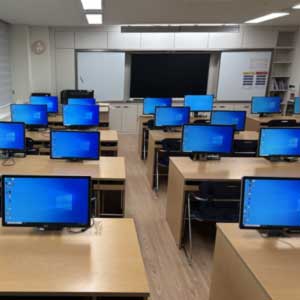
Due to voltage surge, personal computers in school broke down. What to do?

school

Introduction:

Voltage fluctuation issues in educational institutions happen often, which can lead to significant equipment and learning time losses. It’s important to consider effective solutions for protecting technology and saving budget.

Solving the problem:

Damage from voltage fluctuation in schools can be avoided. Here are 2 ways to solve surge issues:

Using solar batteries:

Installing solar panels on the school roof can be an alternative energy source, reducing reliance on grid power and protecting from surges.

Using UPS (uninterruptible power supplies):

UPS provides temporary power in case of power outage or sudden surge, allowing work to finish properly and save data.

However, additional measures to protect technology from voltage fluctuations are another expense. Saving on PCs in schools might lead to buying slow, used computers, which can harm learning quality. One school in Nepal found an original solution – use the ASTER program.

ASTER program from IBIK

ASTER is a multi-user extension for PCs based on Windows and Linux operating systems, allowing the creation of multiple workstations on one computer.

Reducing IT infrastructure costs with ASTER:

Saving on PC purchase: Using ASTER lets you decrease the number of computers needed. The more workstations based on one PC, the greater the savings.

Reducing UPS costs: With fewer computers, the need for UPS also decreases, saving money.

Saving electricity: Fewer computers mean less electricity use, providing long-term benefits.

Reducing heat: Using ASTER reduces heat, saving energy for cooling rooms.

Saving on software licenses: With fewer separate machines, fewer software licenses need buying.

Creating 2 workstations with ASTER on one PC:

To create two workstations, you need:

  • One computer with enough performance.
  • Extra monitors, keyboards, mice.
  • Installing and setting up ASTER:
    • Connect extra peripherals to one PC.
    • Install ASTER and set it up so each monitor, keyboard, and mouse work as separate workstations.
    • Set up PC resource sharing so each user can work independently.

Warning:

Before implementing ASTER, use the 2-week trial version to determine the best setup for the number of workstations on one PC and assess processor load with educational apps while multiple students work at the same time.
a title

DeepSeek + ASTER

DeepSeek + ASTER: Run Powerful Local AI Simultaneously for Multiple Users on One PC DeepSeek (particularly the DeepSeek-R1, DeepSeek-V3 families and distilled versions) became one of the most discussed open-source AI models in 2025–2026. These models outperform or...
eg title

How ASTER Helped Two Brothers

How ASTER Helped Two Brothers Learn Programming and AI on One PC at the Same Time (Real User Review) I’m Youssef, an Egyptian schoolboy. Recently I got a computer with specs that suit both me and my brother. We started learning programming and artificial intelligence...
hdd title

ASTER as a smart solution to rising hard drive prices

Western Digital has sold out all HDD production capacity for 2026: ASTER as a smart solution to rising hard drive prices According to a recent report from Wccftech (February 14, 2026), Western Digital — one of the world's largest hard drive manufacturers — has...
gg

Powerful Gaming PC

Real Customer Case: How a Powerful Gaming PC Became a Dual Workstation Thanks to ASTER After purchasing a powerful gaming computer, I realized that the system resources were far from being fully utilized. The CPU, GPU, and RAM were idle most of the time when I wasn’t...
ai03

ASTER License ROI and Cost Savings

ASTER License ROI: How Quickly Does It Pay for Itself? ASTER license costs are quickly offset by savings on hardware and electricity. A Paid License That Pays Back Fast ASTER is a paid software solution, but its cost is quickly recovered through real savings.When...
ai02

Easy ASTER Setup Without Virtual Machines

Easy ASTER Setup: No Virtualization, No IT Complexity ASTER can be set up in minutes using a simple graphical interface — no IT expertise required. Why Virtual Machines Are Hard to Configure Traditional virtualization solutions require: hypervisor installation virtual...
ai01

ASTER vs Virtual Machines: Multiple Users on One PC

ASTER vs Virtual Machines: Multiple Workstations Without Powerful Hardware ASTER allows 2–3 users to work on one Windows PC without powerful hardware or virtual machines. Why Virtual Machines Require Powerful PCs Virtual machines are a common solution for running...
cad title

Increasing IT Infrastructure Efficiency with ASTER: Savings, Security, and Sustainable Development

In the face of rising IT infrastructure costs, companies are seeking ways to optimize resources, reduce expenses, and enhance cybersecurity. Licenses for professional software such as AutoCAD, ArchiCAD, 3ds Max, CorelDRAW, Siemens NX, CATIA, SolidWorks, and Autodesk...
call title

The Benefits of Using ASTER in Call Centers: Optimization and Savings for Businesses

Call centers are the heart of customer service for many companies, where dozens or even hundreds of operators handle calls, assist clients, and resolve issues daily. This volume of work requires a significant number of computer-equipped workstations, leading to high...
2ws

Comparison of Computer Workstation Rental for Two Weeks: 2 PCs vs. 1 PC with ASTER

In situations where it's necessary to quickly and efficiently create multiple workstations for temporary projects or events, the choice between renting several individual PCs and using one PC with the ASTER software might not be straightforward. Let's examine two...