Powerful Gaming PC

Real Customer Case: How a Powerful Gaming PC Became a Dual Workstation Thanks to ASTER

After purchasing a powerful gaming computer, I realized that the system resources were far from being fully utilized. The CPU, GPU, and RAM were idle most of the time when I wasn’t gaming. At the same time, my wife needed a separate workstation for her work: documents, browser, Zoom, and light office applications. Buying a second full-featured PC seemed too expensive and irrational.

While looking for a way to split the power of a single PC so that we could work simultaneously and independently, I came across ASTER software by IBIK LLC. After reviewing user feedback and documentation, I understood that this was exactly what we needed.

ggg

What happened after installation

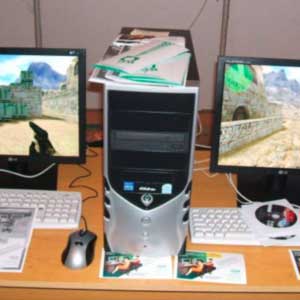
I connected a second monitor (I already had a spare one), added a second keyboard and mouse, and launched ASTER. The setup took no more than 15–20 minutes: the program automatically assigned devices to workstations, and we got two fully independent Windows desktops on a single system unit.

I continue to play demanding games on my monitor — FPS and graphics performance remain exactly the same as before.

My wife works calmly on her screen: Excel, Word, email, online meetings — no lags or conflicts at all.

PC resources are now used much more efficiently: when I’m not gaming, my wife can work comfortably, and vice versa. No need to wait or buy a second computer.

Why ASTER was the perfect solution

  • No virtual machines or complex configuration required — everything works locally and stably.
  • Supports Windows 11, games, office software, and even online games for two users at the same time.
  • Huge savings: instead of spending $700 – $1200 on a second PC, I only invested in a monitor and peripherals (which I already had).
  • An ASTER license for 2–6 workstations costs many times less than new hardware.

Our gaming monster has now turned into a family multifunctional center. I recommend ASTER to everyone who owns a powerful PC but doesn’t use it to its full potential — ASTER truly unlocks the power of your hardware.

If you’d like to try it yourself, download the fully functional 14-day trial right now at ibiksoft.com. Installation is simple, and you’ll see results within half an hour.

IBIK LLC — helping users use their existing hardware efficiently and save on new equipment for over 20 years.

a title

DeepSeek + ASTER

DeepSeek + ASTER: Run Powerful Local AI Simultaneously for Multiple Users on One PC DeepSeek (particularly the DeepSeek-R1, DeepSeek-V3 families and distilled versions) became one of the most discussed open-source AI models in 2025–2026. These models outperform or...
eg title

How ASTER Helped Two Brothers

How ASTER Helped Two Brothers Learn Programming and AI on One PC at the Same Time (Real User Review) I’m Youssef, an Egyptian schoolboy. Recently I got a computer with specs that suit both me and my brother. We started learning programming and artificial intelligence...
hdd title

ASTER as a smart solution to rising hard drive prices

Western Digital has sold out all HDD production capacity for 2026: ASTER as a smart solution to rising hard drive prices According to a recent report from Wccftech (February 14, 2026), Western Digital — one of the world's largest hard drive manufacturers — has...
ai03

ASTER License ROI and Cost Savings

ASTER License ROI: How Quickly Does It Pay for Itself? ASTER license costs are quickly offset by savings on hardware and electricity. A Paid License That Pays Back Fast ASTER is a paid software solution, but its cost is quickly recovered through real savings.When...
ai02

Easy ASTER Setup Without Virtual Machines

Easy ASTER Setup: No Virtualization, No IT Complexity ASTER can be set up in minutes using a simple graphical interface — no IT expertise required. Why Virtual Machines Are Hard to Configure Traditional virtualization solutions require: hypervisor installation virtual...
ai01

ASTER vs Virtual Machines: Multiple Users on One PC

ASTER vs Virtual Machines: Multiple Workstations Without Powerful Hardware ASTER allows 2–3 users to work on one Windows PC without powerful hardware or virtual machines. Why Virtual Machines Require Powerful PCs Virtual machines are a common solution for running...
cad title

Increasing IT Infrastructure Efficiency with ASTER: Savings, Security, and Sustainable Development

In the face of rising IT infrastructure costs, companies are seeking ways to optimize resources, reduce expenses, and enhance cybersecurity. Licenses for professional software such as AutoCAD, ArchiCAD, 3ds Max, CorelDRAW, Siemens NX, CATIA, SolidWorks, and Autodesk...
call title

The Benefits of Using ASTER in Call Centers: Optimization and Savings for Businesses

Call centers are the heart of customer service for many companies, where dozens or even hundreds of operators handle calls, assist clients, and resolve issues daily. This volume of work requires a significant number of computer-equipped workstations, leading to high...
2ws

Comparison of Computer Workstation Rental for Two Weeks: 2 PCs vs. 1 PC with ASTER

In situations where it's necessary to quickly and efficiently create multiple workstations for temporary projects or events, the choice between renting several individual PCs and using one PC with the ASTER software might not be straightforward. Let's examine two...
2laptp

Comparison of Annual Rental: Two Laptops vs. One Laptop with ASTER

When choosing between renting several laptops for long-term use and using one system with the ASTER software to create additional workstations, it's important to consider economic aspects, environmental impact, and usability. Let's examine two scenarios: renting two...